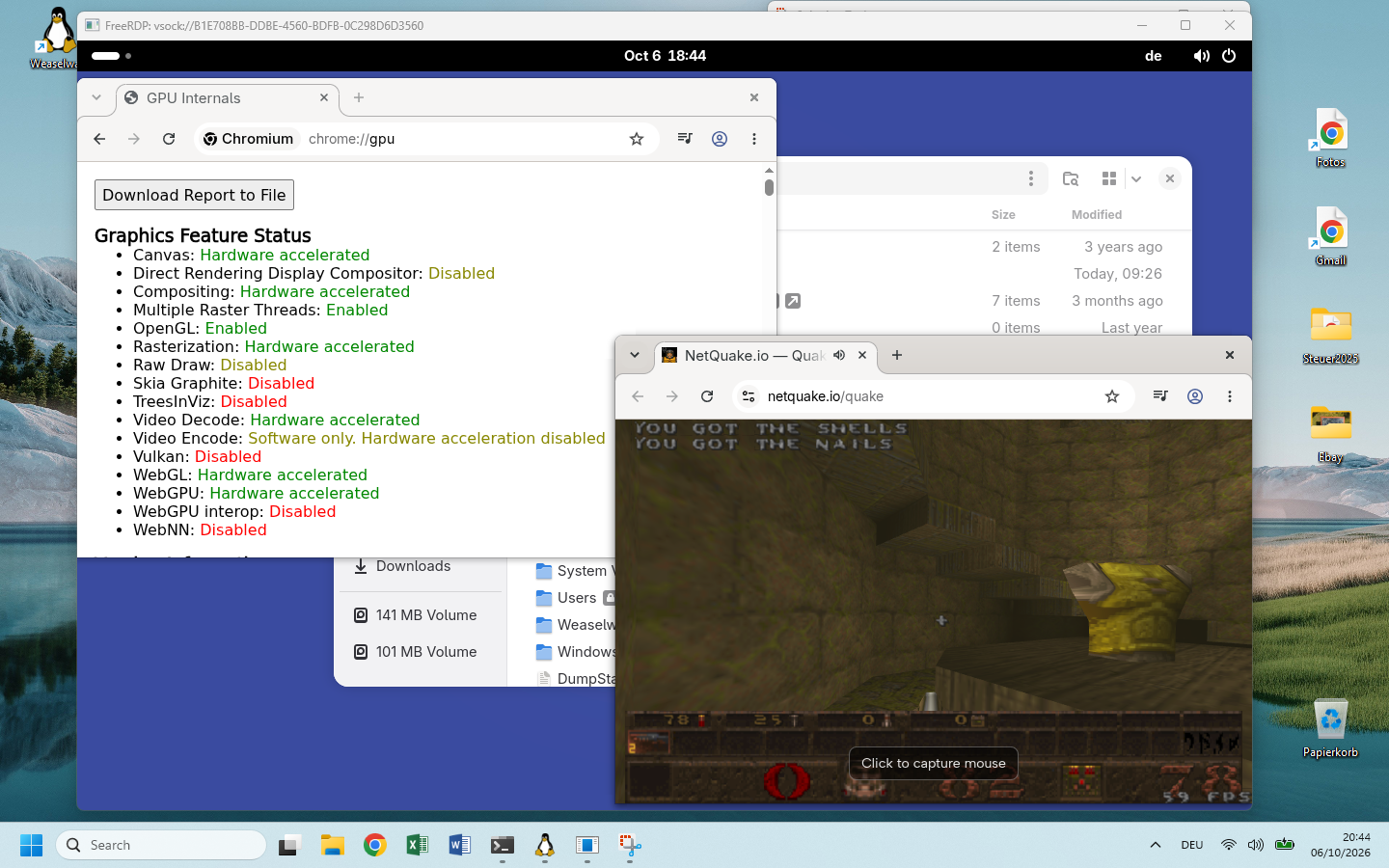
- 120 fps at 4Kframes skip video encoding, so even older hardware keeps up
- Up to 4 monitorsone window per monitor, placed where you like
- 150+ Mesa fixesfor the drivers that run OpenGL and Vulkan on Direct3D 12
- Ready for officevideo calls, Bluetooth headphones and passkeys over Bluetooth work
Why not just WSLg?
WSL already runs Linux GUI apps through WSLg. WSLg shows single app windows, though, and has no way to show a whole desktop. Weaselway is for developers whose company gives them a Windows laptop but who want to work in Linux. It also lets you try a Linux desktop without installing a second operating system. You get GNOME's overview, Plasma's panels or a tiling compositor such as Hyprland.
A Linux desktop in a window or fullscreen
- The whole desktop session runs in WSL and shows up in one window, or in up to four.
- Right Shift+Right Ctrl+Enter switches a window to fullscreen and back.
- GNOME, Plasma or another compositor arranges the apps.
- The desktop's panel, workspaces, settings and touchpad gestures work.
Apps on the Windows desktop
- Each Linux app opens as its own window on Windows.
- Windows arranges the app windows.
- The Linux desktop's panel, workspaces and settings are missing.
- Linux and Windows apps mix on one desktop, so working with them feels disjointed.
Weaselway still needs WSLg turned on, which is the default. The viewer receives the frames through shared memory that WSL sets up only for WSLg.
What works
GPU rendering
OpenGL and Vulkan run on Direct3D 12 through Mesa, on the GPU that Windows shares with WSL. Weaselway's Mesa adds more than 150 fixes and missing features to these drivers.
GNOME, Plasma and others
GNOME and Plasma come set up, and the install script also sets up Hyprland. Other Wayland compositors, such as sway and niri, start through a session script you write.
Several monitors
Show the desktop as up to four monitors, each in its own window that you can place on any Windows monitor.
Keyboard, mouse and touchpad
Swipe and pinch gestures with three or more fingers reach the desktop, so its own gestures work.
Audio and video calls
Sound plays on Windows, and Linux apps can use the microphone and a USB camera. Video calls work.
Clipboard
Copy and paste text, HTML and images between Windows and Linux apps.
USB and Bluetooth
Attach USB devices shared with usbipd-win. Common USB Bluetooth adapters work, for headphones and for signing in with a passkey on your phone.
Laptop battery
The desktop shows the battery charge that Windows reports.
Pick your distro
You need an x86_64 Windows machine with WSL2 and a GPU whose Windows driver supports WSL. The viewer runs from inside WSL, so you install nothing on Windows. Only USB devices need usbipd-win (a tool that shares USB devices with WSL) there.
NixOS
Ready-made imageDownload the GNOME or Plasma image from the latest release and import it in PowerShell. Everything comes prebuilt. Existing NixOS-WSL systems can add the NixOS module instead.
wsl --install --from-file \
  nixos-weaselway-gnome-<version>.wsl \
  --name Weaselway
wsl -d Weaselway
Ubuntu
Install scriptThe script adds weaselway to the GNOME, Plasma or Hyprland packages from Ubuntu. It compiles Mesa and the compositor on your machine, which leaves you time for a coffee.
git clone https://github.com/weaselway/weaselway
cd weaselway
./distro/install.py
Arch Linux
Install scriptThe script adds weaselway to the GNOME, Plasma or Hyprland packages from Arch Linux or CachyOS. It compiles Mesa and the compositor on your machine, which leaves you time for a coffee. Arch's WSL image needs a user and a few packages first.
git clone https://github.com/weaselway/weaselway
cd weaselway
./distro/install.py
Then start the desktop and open it in a window.
ww-install-viewer-link puts a shortcut on the Windows desktop that does both in one click.
ww-start-session
ww-start-viewer
How it works
Four parts carry each frame from the Linux desktop to your Windows screen.
- CompositorGNOME, Plasma, …
- dxgdrmvirtual display
- weaselwaydreads each frame
- ViewerFreeRDP on Windows
The dxgdrm kernel module gives the compositor a virtual display, which the compositor drives like a monitor through KMS (the kernel interface for display output). dxgdrm loads into the Linux kernel of the WSL virtual machine, not into Windows. Each WSL kernel needs its own build of dxgdrm, so after wsl --update installs a new kernel, the desktop does not start until a new release supports that kernel. The compositor needs no patch for this; weaselway patches mutter, KWin and Hyprland only for bugs that show up on the virtual display. Mesa's d3d12 driver runs OpenGL and Vulkan on Direct3D 12, so the frames are drawn on your GPU.
The weaselwayd daemon reads each finished frame and passes it through shared memory to the viewer, a Windows build of FreeRDP. Keyboard, mouse, touchpad and audio use the same connection. The architecture overview has the details.